Automatic phone call testing
13 December, 2025 - Categories: Linux Mobile - Tags: postmarketOS
One of the goals of postmarketOS is to make Linux on Mobile usable for non-technical users.
We are not there yet, one of the reasons is the current lack
of reliability1.
For example phone calls generally work, but sometimes they don't or the
audio quality is very bad.
I discussed about phone call testing with Anjan and Dylan during postmarketOS Hackathon 2025, but after the event i put the idea on the backburner and forgot about it.
I'm daily driving a postmarketOS phone, and recently I made a couple of important phone calls with a barely intellegible audio quality. This gave me the motivation to work again on it, and a week of free time did the rest.
The approach
A phone call has a caller and a receiver, with two audio channels going in the opposite directions.

To test if the phone call is working, we have to test both TX and RX audio channels. We want the test to be automatic, to integrate it in our future Hardware CI.
My first idea was building a phone-call receiver that could be controlled from a network API to trigger calls and record audio. After discussing this with Nicola, he suggested that there was a much simpler way to achieve this, that did not require any network interface.
We can build a phone-call receiver that automatically answers incoming phone calls, and redirects TX audio to the RX channel, creating an echo effect. The caller can send a speech sample and record the incoming audio.

If our DUT (Device Under Test) is the caller, we have tested both channels. The receiver can be shared among many callers with a simple collision detection scheme: retry the phone call if the receiver line is busy.
Unfortunately, on Qualcomm phones, phone call audio is routed in hardware, this
means that the audio data is not accessible from userspace; when a phone call is
established, the audio is routed between the modem, the ASoC (SoC audio subsystem)
and the codec (external chip connected to the speaker, earphone and microphones).
This means that we cannot control outgoing call audio or access incoming call
audio from the phone itself.
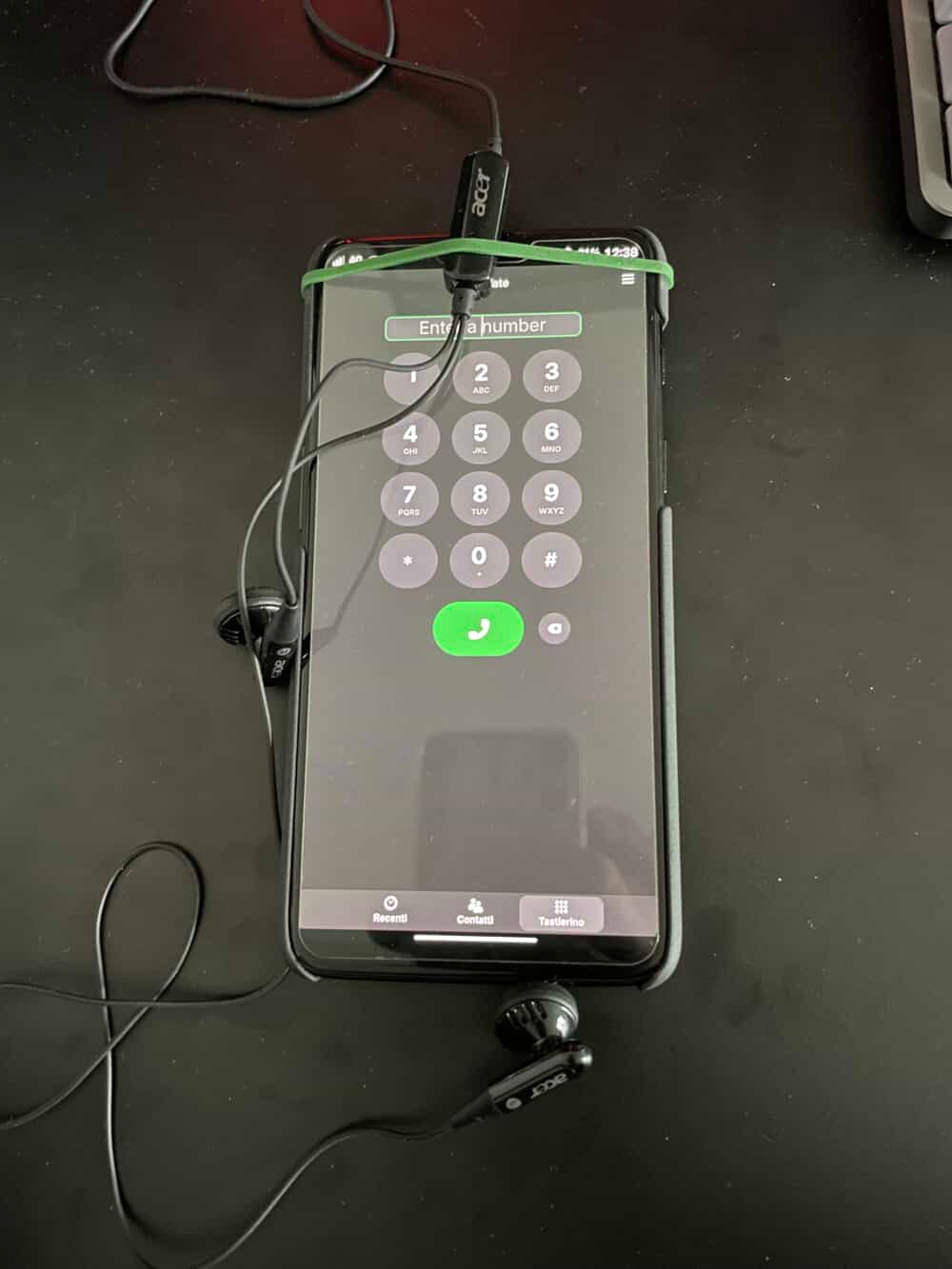
To workaround this, we can playback a speech sample and record the response externally to the phone, by using a pair of earphones coupled to the phone, connected to a USB sound card.

Receiver implementation
The receiver echo service can be reached through the phone network. We can choose the phone technology to use (e.g VoIP, 3G, VoLTE,...) or use different ones to increase our test coverage.
The simplest option for me is VoIP. Simplest is an understatement though, as I experimented with many libraries before I counld find one that worked with my IPv6 VoIP provider. I ended up using the PJSUA2 python API, which is part of the PJSIP C library from 2005.
I started by using the PJSIP cli interface:
pjsua --id "sip:<user@provider>;user=phone" --registrar "sip:<provider>:5060" --realm "*" --username "<user>" --password "<password>" --proxy "sip:<provider-proxy>:5060;lr" --reg-timeout 1800 --ipv6 --auto-answer 200
The output looked promising, but then if failed with this error:
15:29:30.963            pjsua_acc.c  ....SIP outbound status for acc 4 is not active
15:29:30.963 ../src/pjsua-lib/pjsua  ....Assert failed: contact_hdr != NULL
Error: signal 11:
Nooo! the ancient C library failed me 😓
An IPv6 bug in PJSIP
Having run out of options, I decided to try and debug the issue.
The assert was triggered by pjsip/src/pjsua-lib/pjsua_acc.c line 1722:
contact_hdr = (pjsip_contact_hdr*)
              pjsip_parse_hdr(pool, &STR_CONTACT,
                              reg_contact.ptr,
                              reg_contact.slen, NULL);
pj_assert(contact_hdr != NULL);
The failing assert seem to indicate an issue while parsing the contact information message. For those who don't know, SIP, the VoIP control protocol is a textual protocol, this helps us with debugging because we can print the failing message.
I tried to print the contact message by copying a print macro from nearby:
PJ_LOG(4,(THIS_FILE,
        "Contact URI: %.*s",
        acc->contact.slen,
        acc->contact.ptr));`
The result was this:
16:38:50.562            pjsua_acc.c  ....Contact URI: <sip:<user>@[[AAAA:BBBB:CCCC:DDDD:0:0:0:EEEE]]:5070;ob>
16:38:50.562 ../src/pjsua-lib/pjsua  ....Assert failed: contact_hdr != NULL
I dumped the original message with sudo tcpdump -i enp9s0 -A udp port 5060 to
get a better idea:
18:23:35.722310 IP6 quiet.sip > aaaa:bbbb:cccc:dddd:eeee:0:1:1.sip: SIP: REGISTER sip:<provider>:5060 SIP/2.0
`..A...@*......P........*..	.....	............A.REGISTER sip:<provider>:5060 SIP/2.0
Via: SIP/2.0/UDP [AAAA:BBBB:CCCC:DDDD:0:0:0:EEEE]:5060;rport;branch=z9hG4bKPj10aab6a1-a273-4e49-af14-d6eaf921e86d
Route: <sip:proxy-voip-1.iliad.it:5060;lr>
Max-Forwards: 70
From: <sip:<user@provider>;user=phone>;tag=f067a41f-18f6-4dbb-a571-33032ef15abf
To: <sip:<user@provider>;user=phone>
Call-ID: 20ad71f7-3218-495c-b11b-a6b8d2c59144
CSeq: 31913 REGISTER
Contact: <sip:<user>@[AAAA:BBBB:CCCC:DDDD:0:0:0:EEEE]:5060;ob>
Expires: 0
[...]
If you notice, in the Contact: header, the IPv6 address is escaped with [],
to avoid mixing the : within the address with the : port separator (IPv4
doesn't have this problem as uses . to separate the address portions)
Looking back at the printed message, we can see that the issue is the double escaping with square brackets of the IPv6 address.
16:38:50.562 pjsua_acc.c ....Contact URI: <sip:<user>@[[AAAA:BBBB:CCCC:DDDD:0:0:0:EEEE]]:5070;ob>
I found the code doing the escaping by searching for "[". I made a temporary fix to the issue and opened a Merge Request to discuss this upstream.
/* Enclose IPv6 address in square brackets */
if (tp->key.type & PJSIP_TRANSPORT_IPV6) {
    // beginquote = "[";
    // endquote = "]";
    beginquote = endquote = "";
Completing the code and packaging
I completed the receiver echo service by looking at the PJSUA2 examples.
I still have to find a good way of packaging PJSUA2 as a python wheel, as currently I'm installing it from AUR.
You can find the code here: meucci-responder-voip.
Caller implementation
I implemented the caller side of the test with a python script that does the following:
- Trigger a phone call on the phone using SSH and
mmcli - Measure latency playing a tone and calculating cross-correlation
- Playback a speech sample using the USB sound card
- Record the incoming audio using the USB sound card
- Crop recording using measured latency
- Feed original and recorded sample to an audio analysis library
The code can be found here: meucci-caller.
I used the speech samples from the Open Speech Repository.
This is the current output when testing a OnePlus 6 on pmOS edge:
### Test run: 1 ###
* Start phonecall
* Measure latency
PASS: Latency: 536.71ms Peak: 0.76
* Play sample and record feedback
* End phonecall
* Analyze recording (AudioQualityAnalyzer)
+-----+--------+----------+---------+----------------+------+--------+
| Run |  RMS   | Freq[Hz] | SNR[dB] | Dyn. Range[dB] | PESQ |  STOI  |
+-----+--------+----------+---------+----------------+------+--------+
|  1  | 0.0016 | 2118.36  |  41.93  |     116.34     | 1.22 | 0.1125 |
+-----+--------+----------+---------+----------------+------+--------+

### Test run: 2 ###
* Start phonecall
* Measure latency
FAIL: Tone not detected. Latency: 48.38ms Peak: 0.32
* Play sample and record feedback
* End phonecall
* Analyze recording (AudioQualityAnalyzer)
+-----+--------+----------+---------+----------------+------+--------+
| Run |  RMS   | Freq[Hz] | SNR[dB] | Dyn. Range[dB] | PESQ |  STOI  |
+-----+--------+----------+---------+----------------+------+--------+
|  2  | 0.0011 | 2401.81  |  36.82  |     149.19     | 1.03 | 0.2061 |
+-----+--------+----------+---------+----------------+------+--------+
[...]

### Test complete ###
+-----+--------+----------+---------+----------------+------+--------+
| Run |  RMS   | Freq[Hz] | SNR[dB] | Dyn. Range[dB] | PESQ |  STOI  |
+-----+--------+----------+---------+----------------+------+--------+
|  1  | 0.0016 | 2118.36  |  41.93  |     116.34     | 1.22 | 0.1125 |
|  2  | 0.0011 | 2401.81  |  36.82  |     149.19     | 1.03 | 0.2061 |
|  3  | 0.0012 | 2370.85  |  36.33  |     133.83     | 1.04 | 0.2568 |
|  4  | 0.0012 | 2358.92  |   35.9  |     122.63     | 1.03 | 0.2229 |
|  5  | 0.0012 |  2385.3  |  36.06  |     130.35     | 1.03 | 0.254  |
+-----+--------+----------+---------+----------------+------+--------+
The first call in this test worked correctly, but the later four calls were broken. This can be noticed in the reduced PESQ score and SNR.
Test Setup
The test setup looks like this 😅 There is definitely room for improvement.
Next steps
This setup is a proof of concept of the phone call testing. My goal is to eventually integrate this setup into CI-Tron, to automate phone call testing on GitLab merge requests.
This will require:
- Producing output in Unit test format
- Adapting the architecture to the CI-Tron DUT-driven testing
- Introduce a calibration step to compensate for different earphones.